

Digital membership card for associations
Every member's card in their Apple Wallet or Google Wallet: with this year's fees on display, valid at partner shops and without a single envelope to post.
Works natively on iPhone and Android, with no app to install
A digital membership card for associations is the member's card stored in the phone's wallet (Apple Wallet or Google Wallet) instead of being printed and posted: it proves the person is a member with a verifiable QR code, shows whether their fees are paid up and lets the committee reach the whole membership from the card itself. With Idenge, a residents', cultural, professional, student or hobby association, or any other nonprofit, issues every member's card in an afternoon and renews it each year without reprinting.
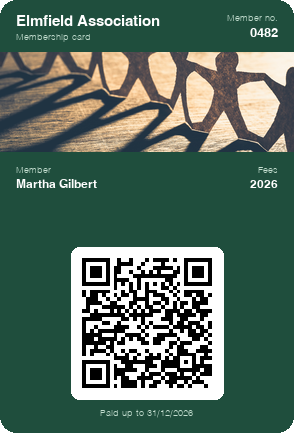
Carry a sample membership card on your phone
In a few seconds you can save to your wallet a card like the one each member would get. To make your association's own, open an account: it is free for up to 20 cards, with no expiry date, every feature included (notifications and unlimited data updates too) and no credit card required.
Create your association's card for free
Scan the code with your phone camera and the sample card will be added to your wallet.
You are on your phone: tap your wallet button and the sample card will be added for you.



With Apple Wallet and Google Wallet there is no app to install. On Android, the card also works with the PassWallet app.
Problems with printed membership cards in associations
Printing and posting the card every year
Each year the secretary prepares the new card, stuffs the envelopes and posts them to members who live across town, in another city or abroad. Printing and postage eat into the membership fees.
Fees paid that the card doesn't show
The card shows the year it was printed, not whether the person has paid. Knowing who is up to date means checking the treasurer's spreadsheet every time someone asks.
Partner discounts the shop can't check
The local bookshop, optician or gym offers a members' price, but at the till all they see is a piece of card with a name on it: they cannot tell whether that person is still a member.
Notices that get lost
The general meeting, a special levy or the spring outing are announced by email and in a messaging group that half the membership has muted.
Printed membership card vs digital membership card
| Printed card | Idenge digital card | |
|---|---|---|
| Getting it to the member | Printer, envelope and postage, even for distant members | It arrives by email and they save it on their phone |
| Fees for the new year | Reprint the card or update the old one by hand | The expiry date changes in the dashboard and on every phone |
| Members' price at a shop | The shop takes the card on trust | The shop scans the QR and sees whether they are still a member |
| Calling the membership together | Letter, email and a message in the group | A notice on every member's card, all at once |
| Knowing what it costs | A printer's quote for each print run | Public prices and free for up to 20 cards |
How to move your association's membership card to mobile in four steps
- 1
Design the card with your association's branding
Logo, colours and the fields your membership list needs: name, member number, membership type (standard, family, junior) and the year they are paid up to.
- 2
Upload the membership list and open sign-up to newcomers
The secretary exports the membership list from the spreadsheet to a CSV file and uploads it to the dashboard: each member receives their card. Newcomers during the year sign up via a link on your website or in the newsletter.
- 3
The member saves it on their phone
They get an email with their card and add it to Apple Wallet or Google Wallet in two taps, with no association app and no passwords, so it works even for members who use their phone just for calls and texts.
- 4
Verify and send notices from the dashboard
At the door of an event or at a shop till, any phone can check the card's QR code; from the same dashboard, the committee writes to the whole membership or to a group.
Digital membership card features for managing association members
Direct contact with the whole membership
Card notifications appear on the member's phone screen, not in an inbox they never open: deadlines, activities or a change of venue, for everyone or just for one section or regional committee.
QR verification with any phone
The card's QR code opens the member's identity page with their current details. Anyone can check it with their phone camera, with no scanners or apps, and the card of someone who has left stops being valid even if it is still on their phone.
The same card, year after year
There is no need to issue a new card every year: it stays the same, with an up-to-date expiry date, on the member's phone all year round. You decide which details are public when it is scanned and which stay private to the committee.
Sample campaign
Member benefits and campaigns from the digital membership card
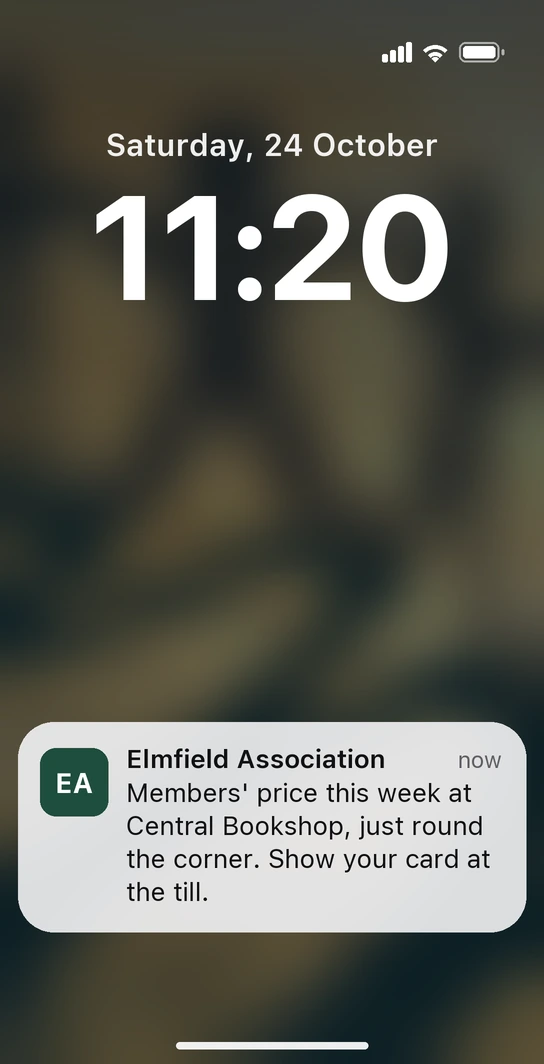
Saturday, mid-morning. Martha is strolling along the local high street and, as she walks past Central Bookshop, her phone alerts her: “Members' price this week at Central Bookshop, just round the corner. Show your card at the till.” The bookshop is one of the association's partner shops, and the alert comes from the card Martha already carries in her wallet: you placed it on that street for the week of the offer, and the benefit is written in a field on the card that you change every month. At the till, all she has to do is show it.
-
The spring trip, with places left on display
You announce the trip with a notification to the whole membership and put the number of places left in a field on the card. You update it as people sign up and every member sees the latest figure on their phone: the coach fills up sooner and nobody hears about it too late.
-
Recruiting at a fair or an open day
On the association's stand you display a sign-up QR code: anyone interested joins from their phone and walks away with the card there and then. From that day on they receive the association's notices, and the committee has a new member before the conversation is forgotten.
For an association, the card is the channel: every notice that arrives and every partner offer that gets used is one more reason to renew next year.
Associations that already run their membership card on Idenge










We are very happy with Idenge's digital cards and with the great service they give us. Moving from physical to digital cards was a big change for our organisation, but the transition was very easy thanks to how simple it is to set up. They are good, affordable and allow attractive designs. We recommend them 100%.
How much does a digital membership card cost for an association?
Prices are public, so the committee can compare before deciding. You start free for up to 20 cards, with no expiry date and no credit card (enough to try it out with the committee) and, once you go past 20, plans start from €8.99/month for 100 cards, which also cover the first 20, with no lock-in. No printing or postage to add on top. See Idenge pricing.
Frequently asked questions
No. They receive the card by email and save it in Apple Wallet or Google Wallet, which already come with the phone. It looks the same on both and there is nothing to register for, which older members appreciate.
On their own card, which shows the year or date they have paid up to. When the treasurer records the payment, you change that detail in the dashboard and the card shows it straight away; anyone who scans the QR code can also see whether it is still valid.
With the camera on its own phone, without installing anything: it scans the QR code on the card and sees the name and whether the person is a current member. The shop never sees your dashboard or the member's other details.
Yes, and that is where it makes the biggest difference: the card travels by email, so it doesn't matter where each member lives. You save on postage and the committee manages everything from the dashboard, with no office or opening hours.
Yes. You send the notice as a notification to the whole membership and leave the date, venue and agenda in a field on the card. On the day of the meeting, the people at the door scan each attendee's QR code to check they are a member.
To start with, nothing: it is free for up to 20 cards, with no expiry date and no credit card required. Once you go past 20, plans start from €8.99 a month for 100 cards, which also cover the first 20, with no lock-in; and because prices are public, the committee can take the exact figure to the general meeting.
This year, your members' cards with no envelopes or postage
Design the card, upload the committee's details and watch it reach their phones this very afternoon. It is free for up to 20 cards, with no expiry date and no credit card, and when you add the rest of the membership, the pricing is public and set by tier.
Start free with your committeeMore than 1,000 cards, or would you rather talk it through? Talk to us