

Digital student ID card for schools and universities
Every student's ID in their Apple Wallet or Google Wallet from day one: the whole intake onboarded by the registry, verifiable by QR on campus, no plastic printed.
Works natively on iPhone and Android, with no app to install
A digital student ID card is a student's credential stored in their phone's wallet (Apple Wallet on iPhone, Google Wallet on Android) instead of on plastic: it identifies them on campus with a verifiable QR code, keeps their programme, year and enrolment status up to date, and needs no app. With Idenge, a university, business school, college or school issues a whole intake's cards from the registry in an afternoon, straight from its enrolment list.
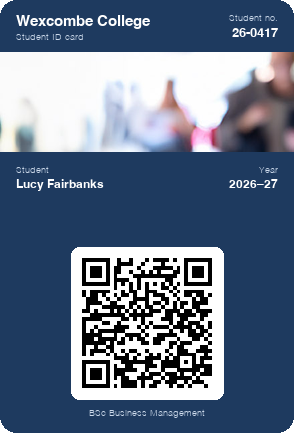
Try a student ID card on your own phone
In a few seconds you can have a sample card in your wallet, just as a student would see it on the first day of term. When you want your school's own, create the account and design it: it is free for up to 20 cards, with no expiry date, every feature included, no credit card and no sales call.
Create your school's ID card for free
Scan the code with your phone camera and the sample card will be added to your wallet.
You are on your phone: tap your wallet button and the sample card will be added for you.



With Apple Wallet and Google Wallet there is no app to install. On Android, the card also works with the PassWallet app.
Problems with plastic student ID cards in schools and universities
A whole new intake every September
Collecting photos, printing, stuffing envelopes and queuing at the registry to hand cards out. By the time they arrive, some students have spent weeks in lectures without ID.
Replacements that never end
Cards lost in the first term, snapped mid-year or with a three-year-old photo: each replacement means a job for the registry, an awkward fee and a student without ID until it arrives.
An ID nobody can check
At campus security, the library or an exam door, nobody can tell whether the plastic is valid, the student still enrolled or the card someone else's: you glance at the photo and hope.
A channel the plastic card doesn't have
Room changes, enrolment deadlines and campus closures go out by emails nobody opens and noticeboards nobody reads; a plastic card can't tell anyone anything.
Physical university ID card vs digital student ID card
| Plastic card | Idenge student ID card | |
|---|---|---|
| Onboarding an intake | Photos, printing and weeks of queues at the registry | Upload the enrolment CSV; each card lands on its student's phone |
| A lost card | Replacement, fee and days without ID | Nothing to lose: it's on their phone |
| Checks at the gate, library or exams | Look at the photo and trust it | Scan the QR code: live enrolment status |
| Change of year or programme | A new card or this year's sticker | Updates itself in every wallet |
| Notices from the institution | Mass emails and the noticeboard | A notification on the card, to one group or the whole campus |
| Cost of getting started | Minimum print order and a card reader | Free for up to 20 cards, no expiry date; public tiered prices |
How to issue a digital student ID card to a whole year group in four steps
- 1
Design the card with your institution's branding
Logo, brand colours and the fields your ID needs: name and photo, student number, programme, academic year and enrolment validity.
- 2
The registry uploads the enrolment list
Export the year's enrolment as a CSV and upload it: Idenge creates a card for every student in the intake at once. If your student records system allows it, connect it through the API so each new enrolment gets its card; for one-off sign-ups, use a self-registration link.
- 3
Students save it to their phone before day one
An email arrives (at their institutional address, if you prefer) and they add the card to Apple Wallet or Google Wallet in two taps, with no app or new passwords: on welcome day they already carry their ID.
- 4
Verify on campus and send notices from the dashboard
At the gate, library or exam room, any phone scans the QR code and confirms the enrolment is valid; from the same dashboard you roll the year over in June, expire the cards of leavers and message one intake or everyone.
Digital student ID card features for universities and schools
Identity verification on campus
The QR code opens the student's identity page with their photo, programme and enrolment status: any phone can check it at the gate, library, lab or exam, and a card whose holder has left is spotted instantly. Identification is part of the card, not a separate system.
Onboard the whole intake by CSV or API
From enrolment to every student's wallet in an afternoon: import the year from a file, let the API create a card for each new enrolment, or share a self-registration link with latecomers. No photos to collect, no cards to hand out.
No app: the wallet already on every phone
Students install nothing: the card lives in Apple Wallet or Google Wallet, with the same design and QR code on iPhone and Android, for a four-year degree, a master's or an exchange semester alike.
Sample campaign
The digital student ID card as your institution's channel: perks and campaigns for students
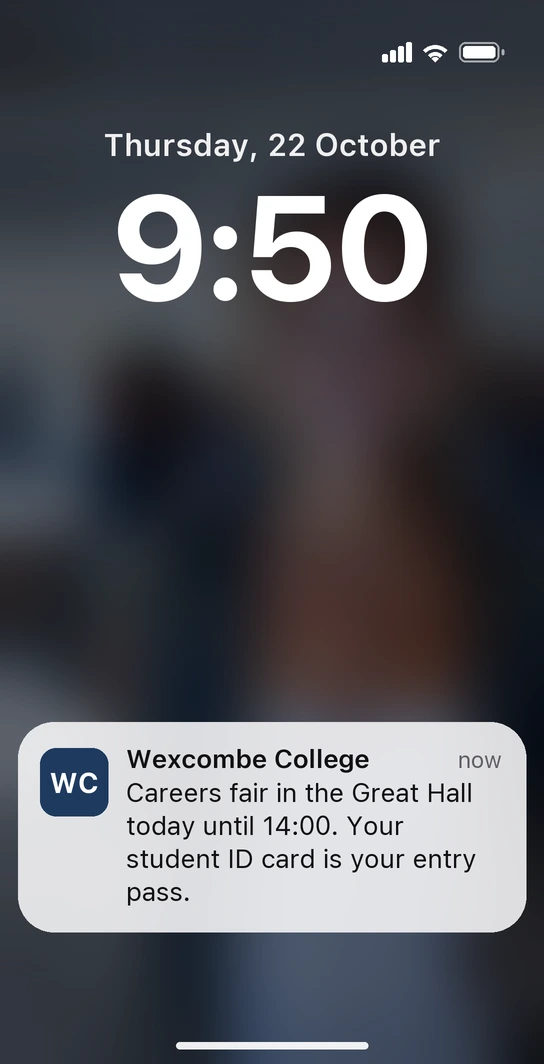
Thursday, ten to ten in the morning. Lucy is crossing the foyer on her way to a lecture when her phone buzzes: “Careers fair in the Great Hall today until 14:00. Your student ID card is your entry pass.” The companies looking for interns are twenty metres away and she had no idea: the message comes from the ID already in her wallet, and you set it to appear in the foyer on the morning of the fair. At the Great Hall door, the careers service team scans her QR code with any phone and knows she's a student here; the schedule of company talks sits in a card field, and if a company changes its slot, you correct it from the dashboard and it updates on every phone.
-
From student to alumni, without issuing another card
On the day Lucy graduates, you switch her programme to alumna from the dashboard and her ID becomes her alumni card, in the same wallet. The institution keeps a direct line to its graduates to tell them about continuing education, the next master's or their year group's reunion.
-
Open days and enrolment deadlines, by push notification
The open day, enrolment opening for next year or the last day to secure a place arrive as a notification for whoever needs to know (one programme, one intake or the whole institution) instead of getting lost in the institutional inbox.
More than an ID: the card that identifies your students on campus is also the channel your institution uses to talk to them, as students today and as alumni tomorrow.
Schools and universities already issuing student IDs with Idenge







Our experience with Idenge is excellent. It has allowed us to offer our students a digital student card: a convenient, practical, modern, fully functional solution that is committed to the environment and sustainability.
The accreditation management platform is very intuitive, reliable, allows you to update the data immediately and has the necessary flexibility for the design of the cards, something very important to take care of and share the brand image with our students.
How much does a digital student ID card cost for a school or university?
Prices are public and tiered. You start free for up to 20 cards, with no expiry date and no credit card (enough to pilot it with one master's programme or class). Past 20, plans start from €8.99/month for 100 cards, which also cover the first 20, down to €0.038 per card per month on the larger annual tiers, with no lock-in. Above 1,000 cards, a tailored plan. You sign up and run it yourself: no demos, no quotes. See Idenge pricing.
Frequently asked questions
No. The card arrives by email and is saved to Apple Wallet on iPhone or Google Wallet on Android, with the same design, QR code and notifications. No app to maintain, no passwords, no support queues on the first day of term.
Yes. All campuses are managed from one dashboard and each student's campus is a field on their card. Notices go out by group: a change to library hours at one campus reaches just the students based there.
Yes, and they often need it most: they never visit the registry. They sign up with a link, carry proof on their phone that they study with you, and get their programme's notices like everyone else.
You decide. Expire it, and its QR code shows it as invalid even if it's still on the phone, or switch the programme to alumni and stay in touch through the same card.
Sign them up with their stay as the validity period, say September to January. For that period they're identified like any other student; after it, the QR code shows the card as no longer valid, with nothing to collect.
It's free for up to 20 cards, with no expiry date, and signing up needs no credit card. Past 20, plans start from €8.99 a month for 100 cards, which also cover the first 20, with no lock-in or set-up fee; above 1,000 cards, a tailored plan.
This academic year, issue student IDs without the plastic
Design the card, upload one group's enrolment list and watch it appear on their phones before classes start. It's free for up to 20 cards, with no expiry date and no credit card; as your intake grows, Idenge pricing scales by tier.
Create your student ID card for freeMore than 1,000 cards, or would you rather talk it through? Talk to us