

Digital patient card for medical centres
Every patient's card in their Apple Wallet or Google Wallet: to check in at reception, with their cover kept up to date and appointment reminders on their phone, even for people who don't get on with apps.
Works natively on iPhone and Android, with no app to install
A digital patient card is the card of a medical centre, clinic or health insurer stored in the patient's phone wallet (Apple Wallet or Google Wallet): it identifies them at reception with a QR code, shows their plan or policy details always up to date and lets the centre remind them of appointments and check-ups. With Idenge, the centre issues it from its patient list, without asking patients to install an app or create a password.
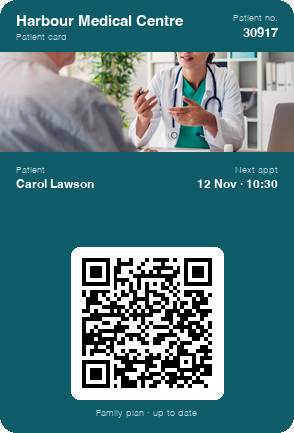
Try a patient card on your phone
In a few seconds you have a sample card in your wallet, like the one each patient would receive. To create your centre's own, open an account: it is free for up to 20 cards, with no expiry date and every feature included, notifications too, with no credit card and no salesperson to talk to.
Create your centre's card for free
Scan the code with your phone camera and the sample card will be added to your wallet.
You are on your phone: tap your wallet button and the sample card will be added for you.



With Apple Wallet and Google Wallet there is no app to install. On Android, the card also works with the PassWallet app.
Problems with plastic patient cards in clinics and medical centres
The card left at home on the day of the appointment
The patient arrives at reception without their clinic or insurance card, and staff have to look them up by name and date of birth while the queue grows.
Cover changes, the plastic doesn't
The plan changes, a dependant is added or the policy is renewed, and the printed card still says what it said before.
Reminders that never get through
Nobody answers the call the day before and the text message gets lost among the rest: the appointment is forgotten and the slot in the diary goes empty.
Patients of every age
Asking an older person to install the centre's app and remember a password is a sure way to lose them along the way: the patient portal ends up being used by a handful of people.
Plastic patient card vs digital patient card
| Plastic card | Idenge patient card | |
|---|---|---|
| Arriving at reception | Looking the patient up by name if they forget it | It's on their phone and they identify themselves with the QR code |
| A change of plan or cover | A new card in the post | It updates itself on their phone |
| Notices from the centre | Posters and phone calls | A notification on the card, to everyone or to a group |
| What the patient needs | Keeping hold of the plastic | Nothing to install and no passwords |
| Getting started | Printing and posting | Free for up to 20 cards and prices in plain sight |
How to issue your centre's digital patient card in four steps
- 1
Design the centre's card
The clinic's or insurer's logo and colours, plus each patient's fields: patient or policy number, plan and next appointment.
- 2
Upload the list of patients or policyholders
Reception or the insurer exports the list to a CSV file and uploads it to the dashboard; if your appointment or policy software allows it, the API creates the card for each new registration.
- 3
The patient saves it on their phone
They receive it by email and add it to Apple Wallet or Google Wallet in two taps. There is no app and no password, and that is what gets even the most tech-shy patients using it.
- 4
Identify patients and send notices from the dashboard
At reception, any phone scans the QR code and confirms who the patient is; from the dashboard the card is kept up to date and notices go out to every patient or to a group.
Digital patient card features for clinics and health insurers
Notices from the centre on the phone screen
Vaccination campaigns, changes to opening hours or the start of this year's check-ups: the notification appears on the patient's screen, without relying on a phone call.
A card you never have to reissue
Any detail you change in the dashboard, or that your system sends via the API, is updated on the patient's phone: plan, home centre or helpline number, without printing another card.
For patients of any age, on any phone
In Apple Wallet or Google Wallet, with the same design and nothing to download or remember: the patient opens the card just like a boarding pass or a supermarket card.
Sample campaign
The digital patient card as your medical centre's channel: health campaigns and services
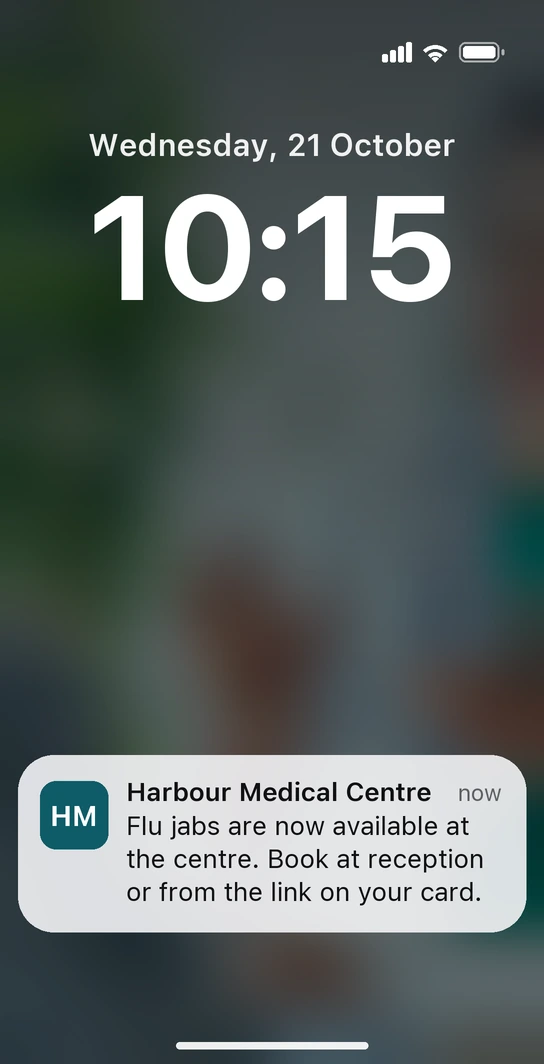
Wednesday, quarter past ten in the morning. Carol walks past the medical centre on her way to the shops and her phone alerts her: “Flu jabs are now available at the centre. Book at reception or from the link on your card.” She hasn't had to download anything: the alert comes from the patient card she keeps in her wallet, and you placed it at the centre's door for the weeks of the campaign. The booking link is on the card, and the date she is given then appears in her next-appointment field.
-
A new service, introduced to your patients
You open a physiotherapy unit or launch a sports check-up and announce it with a notification to the centre's patients, with the dates in a field on the card. The service gets going with people who already trust you.
-
Seasonal advice
Heatstroke in summer or hay fever in spring: a short notice with a practical tip and the nurse clinic's hours, which the patient can find on their card afterwards.
Beyond identifying the patient at reception, the card is the centre's channel: it reminds them to get vaccinated, introduces new services and brings them back when it's time.
Healthcare and insurance with the Idenge patient card

IDenge has been very useful for our customers, through it they can access their information with a click on their phone, without the need for cumbersome keys or codes. As a company, it is a very practical means to engage with customers in a very accessible way.
How much does a digital patient card cost for a medical centre?
Prices are public. You sign up and run it yourself: no demos, no quotes. You start free for up to 20 cards, with no expiry date and no credit card (enough to try it with one practice) and, once you go past 20, plans start from €8.99/month for 100 cards, which also cover the first 20, with no lock-in. Above 1,000 cards, there is a tailored plan. Every tier is listed on Idenge pricing.
Frequently asked questions
No. They receive the card by email and save it in Apple Wallet or Google Wallet, which already come with their phone, without creating a username or password. It works the same way on both systems.
Whatever you decide to make public, and nothing more: on each card you choose which information is shown when the QR code is scanned and which stays private. We recommend showing the name, patient number and expiry date, and never putting clinical information on the card.
Yes: policy number, plan, dependants or the assistance helpline, as fields on the card. When the policy is renewed or the plan changes, you update the detail and the policyholder's card shows it straight away.
The card can go on a relative's phone: a son, daughter or carer saves it in their own wallet, next to their own card if they have one, and shows it at reception. That way they also receive the centre's notices for the person they look after.
Yes. The next appointment goes in a field on each patient's card and shows up on their phone as soon as you change it; you can also send a notice to a group of patients, for example those of one practice, when bookings for check-ups open.
To get started with one practice, nothing: it is free for up to 20 cards, with no expiry date and no credit card required. Once you go past 20, plans start from €8.99 a month for 100 cards, which also cover the first 20, with no lock-in.
Your medical centre, on every patient's phone
Design the card, load it for one practice's patients and watch them arrive at reception with it. It is free for up to 20 cards, with no expiry date and no credit card; for the whole centre, the pricing is public and set by tier.
Start free with your centreMore than 1,000 cards, or would you rather talk it through? Talk to us
Other use cases