

Digital veterinary card: the loyalty card for veterinary centres
A card for every client household, in their Apple Wallet or Google Wallet: with their pet's details, the next vaccination in plain sight and the practice's updates on their phone.
Works natively on iPhone and Android, with no app to install
A digital veterinary card is the practice's client card stored in the owner's phone wallet (Apple Wallet or Google Wallet): it identifies the household and their pet with a QR code, carries the animal's details and the date of its next vaccination, and lets the practice send reminders about check-ups, campaigns and changes to opening hours. With Idenge, a veterinary centre hands it over at the first visit, and the client doesn't have to install any app.
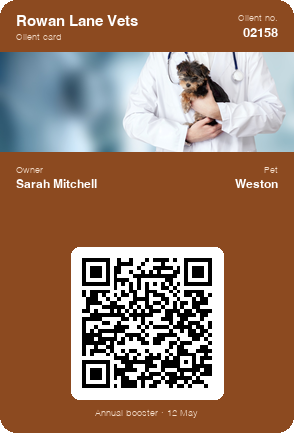
Save a sample practice card to your phone
In a few seconds you have a card in your wallet like the one each owner would carry, with its QR code and their pet's details. To make one for your veterinary centre, open an account: it is free for up to 20 cards, with no expiry date, every feature included, alerts too, and no credit card or commitment.
Create your practice's card for free
Scan the code with your phone camera and the sample card will be added to your wallet.
You are on your phone: tap your wallet button and the sample card will be added for you.



With Apple Wallet and Google Wallet there is no app to install. On Android, the card also works with the PassWallet app.
Problems keeping pet owners loyal to a veterinary centre
Forgotten vaccinations
The vaccination record ends up in a drawer and the reminder call comes when the owner can't pick up: the jab gets delayed, and so does the visit.
The pet's details live on the practice computer
Breed, microchip number and allergies are in the practice management system, but the owner doesn't have them to hand when boarding kennels or an out-of-hours emergency vet asks for them.
Households with several animals
Two dogs and a cat mean three vaccination records, three vaccination schedules and three separate conversations with the same client.
Owners buy elsewhere what you already stock
Flea and worm treatments, pet food or grooming: if clients don't know what you offer or when there's a campaign on, they buy wherever they see it advertised.
Vaccination record and paper card vs the practice's digital veterinary card
| Record book and paper card | Idenge digital card | |
|---|---|---|
| Next vaccination | Noted in the record book, if it doesn't get lost | On the card in their phone, with a reminder when it's due |
| Identifying the client at reception | Searching for their name in the system | Scanning their QR code and seeing their details instantly |
| Announcing a campaign | A poster in the waiting room | A notification on the card, also when they walk past |
| Getting started | Printing client cards | Free for up to 20 cards, no quote needed |
How to set up the digital veterinary card for your clinic in four steps
- 1
Design your practice's card
Your practice's logo and colours, plus the fields you'll use: owner's name, pet's name, client number and the date of the next vaccination.
- 2
Register the household at the first visit
At reception, when you open their record, you register the owner and send them their pet's card; if your clients are already in your practice management system, upload them all at once in a CSV file.
- 3
The owner saves it on their phone
They receive it by email and add it to Apple Wallet or Google Wallet in two taps, with no practice app: it goes with them every time they take the dog out.
- 4
Send reminders and updates from the dashboard
After each visit you update the date of the next vaccination, and you send updates to all clients or to the owners of one kind of animal: the annual booster campaign or the senior cat health check.
Digital veterinary card features for veterinary centres
Reminders that reach the phone
The card's notifications appear on the owner's screen like any other alert: the annual check-up, the vaccination or the worming treatment, without depending on them answering the phone.
Alerts as they walk past the practice
Set your practice's location and the card shows your message when the owner is nearby: a seasonal campaign arrives just when they can pop in.
Identify, build loyalty and stay in touch with one card
The same card identifies the household at reception with its QR code, holds the pet's details and lets you talk to the owner. It doesn't replace your practice management system: it complements it on the client's phone.
Sample campaign
Marketing campaigns for veterinary clinics from your clients' digital veterinary card
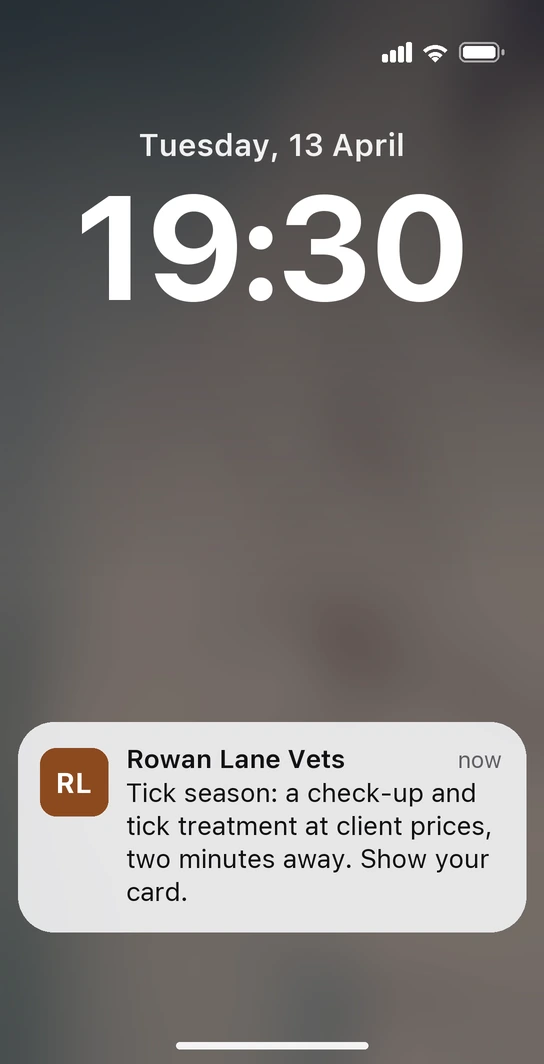
A Tuesday in April, half past seven in the evening. Sarah is walking Weston in the local park and, as she nears the practice, her phone lights up: “Tick season: a check-up and tick treatment at client prices, two minutes away. Show your card.” She doesn't have any app from the practice: the alert comes from Weston's card, saved in her wallet, and you set it to appear around the practice during the highest-risk weeks, with the campaign price written in a field on the card. She walks in with the dog, shows the card at reception and the check-up happens that same evening.
-
Grooming, in the gaps in the diary
In a week with free grooming slots, you let dog owners know there are appointments available; the price for those days goes in a field on the card, which you remove as soon as the diary fills up.
-
What your pet needs for the summer
When the warm weather arrives, an alert to all clients about what the practice shop has for those months; the offer stays written on the card for as long as it runs.
No more lost record books or unanswered calls: the card that identifies the pet is the channel that brings the owner back to the practice, when it's time and when they're passing by.
How much does a digital veterinary card cost for a veterinary centre?
You sign up and run it yourself: no demos, no quotes, and the prices are published. You start free for up to 20 cards, with no expiry date and no credit card, so you can try it out with your most loyal clients. Once you pass 20, plans start from €8.99/month for 100 cards, which also cover the first 20, with no lock-in. All the details are on the Idenge pricing page.
Frequently asked questions
No. They receive the card by email and save it to Apple Wallet or Google Wallet, which come with the phone, with the same design and the same alerts on both. No passwords to remember in the waiting room.
The most practical option is one card per pet, each with its own animal's name and details: they all sit in the same wallet and the owner swipes from one to the next. Bear in mind that each card counts towards your pricing tier.
Whatever you decide: name, species and breed, microchip number, allergies or the date of the next vaccination, among others. You also choose which information on the card is shown when the QR code is scanned and which stays private.
Yes. You change the main image from the dashboard and it updates on every phone: a dog in the snow in winter, the vaccination campaign in spring or a heatstroke warning in summer.
Yes. The emergency phone number, the out-of-hours rota or the closure dates go in a shared field that you change once for everyone; if it's urgent, add a notification so nobody turns up to a closed door.
With a small client list, it may cost you nothing: it is free for up to 20 cards, with no expiry date and without giving your credit card details. Beyond that, plans start from €8.99/month for 100 cards, which also cover the first 20, with no lock-in.
Put your practice in your clients' pockets
Design the card, give it to the owners who come in this week and send your first alert. You pay nothing until you pass 20 cards, and the free plan has no expiry date and asks for no credit card; when you use it with all your clients, the pricing is public.
Start free with your practiceMore than 1,000 cards, or would you rather talk it through? Talk to us
Other use cases