

Digital membership card for clubs with teams and federations
The team manager checks each player's registration and age group on a phone before kick-off. Members and players carry the card in Apple Wallet or Google Wallet, up to date all season.
Works natively on iPhone and Android, with no app to install
A sports club membership card on the phone is a pass that the member or player keeps in Apple Wallet or Google Wallet. It carries their registration number and this season's age group, plus a QR code that the team manager or the referee can read with any phone to see whether they are up to date. With Idenge, a club with teams or a governing body creates a whole season's cards in an afternoon: for members, for players and, in a federation, for every registered athlete. If your members simply come in on a paid membership, with no teams or registrations, see the case for gyms and sports clubs.
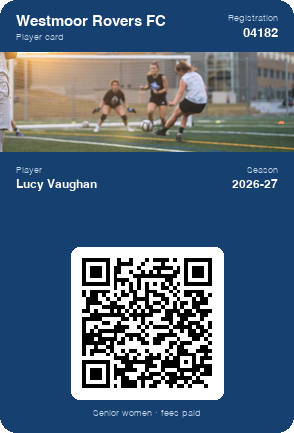
Carry a sample player card on your phone
In a few seconds you have a card in your wallet like the one your players and members would get, and you can show it to the committee at the next meeting. To make the club's own, create your account: it is free for up to 20 cards, with no expiry date, every feature included and no credit card.
Create your club's card for free
Scan the code with your phone camera and the sample card will be added to your wallet.
You are on your phone: tap your wallet button and the sample card will be added for you.



With Apple Wallet and Google Wallet there is no app to install. On Android, the card also works with the PassWallet app.
Problems with paper registrations and plastic cards in clubs with teams
A form for every player, every season
Each September it all starts again: photos, forms, membership cards and registrations that arrive in October, after the league has kicked off.
Age groups that change every year
Under-11s move up to under-13s, youth players become seniors and a social member becomes a season ticket holder. The plastic keeps last year's age group.
Subs that need chasing
Fees are paid in two or three instalments, and the committee ends up going through lists at the ground to work out who owes the second one.
Families who don't read the group chat
Kick-off changes, squad lists and travel plans go through messaging groups that buzz all day. The important message gets lost among the rest.
Paper registration vs digital card for your club
| Paper or plastic | Idenge digital card | |
|---|---|---|
| Start of the season | Print cards and hand them out at the ground | Import the list and everyone gets theirs by email |
| Moving up an age group | A new card, or crossings-out | Change the field and it shows on their phone at once |
| Checking before the match | Photocopied registrations in a folder | The team manager reads the QR code on their phone |
| Telling one team | Messages in the parents' group | A card notification to that team only |
| Getting started | A print order before September | Free for up to 20 cards, starting today |
How to digitise your sports club's membership and player cards in four steps
- 1
Design the club card
Add the club crest and colours, and choose what each card carries: registration number, age group, team, season or subs status.
- 2
Load the season's squad
In September you upload the list of players and members your coordinator already keeps, as a CSV. Players who join once the season has started sign themselves up with a QR code at the club office.
- 3
Players and families save it
The card arrives by email and goes into Apple Wallet or Google Wallet. For junior teams, the player's card can live on a parent's phone.
- 4
Check on match day and message by team
The team manager reads the QR codes before the players go out. From the dashboard you change age groups and subs, and send messages to one team, one age group or the whole club.
Managing members, players and registrations with the digital club card
Registration and age group checked with a QR code
The QR code opens the player's identity page with their photo next to the registration and the age group they play in this year. It works at your own ground, at a tournament or at an away fixture.
Messages by team or age group
Saturday's kick-off moved, the coach for the away trip or training called off for rain. The message arrives as a card notification for that team's families and nobody else.
A new season without new cards
In July you change the season and age groups from the dashboard, one by one or in bulk with a CSV. The cards update on every member's and every player's phone.
Sample campaign
Campaigns for club members and families, straight from the club card
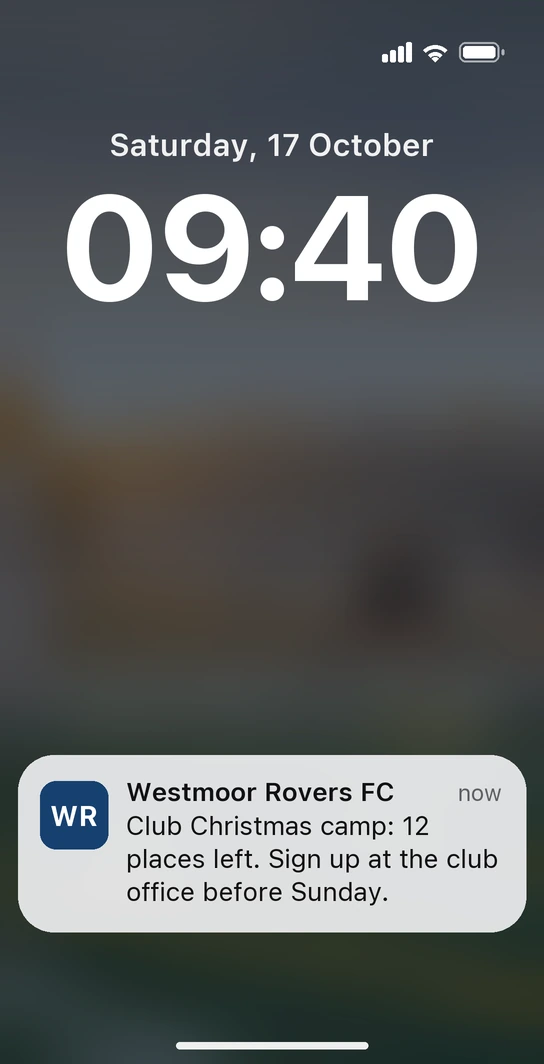
Saturday, twenty to ten. Lucy arrives at the ground for the senior women's match and, as she walks through the gate, her phone buzzes: “Club Christmas camp: 12 places left. Sign up at the club office before Sunday.” You set the message up on Thursday to pop up on arrival at the ground, when families have the office right in front of them. Each time a place goes, you lower the number in a field on the card, and by Sunday afternoon the camp is full.
-
New kit, one age group at a time
The under-13s change kit this year and nobody else does. The message goes only to that age group's families, with the club shop's opening hours, and the price sits in a card field until the sizes run out.
-
The second instalment of subs
In January the second payment falls due. The message goes only to those who still owe it, and once they pay, the “Subs” field on their card switches to “Paid” without the treasurer phoning anyone.
Nothing to redeem and nothing to stamp. The card the team manager reads before the match is also the channel that fills your camp and brings subs in on time.
Clubs and federations already running their cards on Idenge







How much does a digital card cost for a club or a federation?
Prices are public: you start free for up to 20 cards, with no expiry date and no credit card, just enough to try it with one team. Once you go past 20, plans start from €8.99/month for 100 cards, which also cover the first 20, with no lock-in. You sign up and run it yourself: no demos, no quotes. For a federation with more than 1,000 cards, the tiers and the contact for larger volumes are in Idenge pricing.
Frequently asked questions
Yes. The federation creates the registration card with the athlete's licence number and discipline, updates the age group each season from the dashboard and sends it to its athletes by email or through their clubs. Whether that card replaces the paper registration is up to each federation's own rules.
No. The club registers the player with its federation, and that registration is still the document for competing. What you can do is put the registration number on the player's card, so it's to hand at the ground without digging through paperwork.
Yes. The card goes to whichever email address you enter when you sign the player up, and the family saves it in their wallet. At the ground, the team manager reads the QR code on the phone of whoever comes with the player.
Upload a CSV with each player's new age group and season, or change them one by one in the dashboard. The cards update on every phone with nothing to reprint.
No. The card is saved to Apple Wallet on an iPhone or Google Wallet on Android, both already on the phone. Nobody creates an account or downloads anything.
It's free for up to 20 cards, with no expiry date and no credit card. Every member or player signed up counts as one card. If your four teams and your members come to 100 or fewer, the plan starts from €8.99 a month, with no lock-in.
Next season, the club card on everyone's phone
Design the card this week, try it with one team before the first match and load the rest of the club when you're ready. Start free for up to 20 cards, with no expiry date and no credit card. As the club grows, check Idenge pricing.
Start free with up to 20 cardsMore than 1,000 cards, or would you rather talk it through? Talk to us